Create a TXT File Online — Free, Instant, Private
Type or paste your text, choose a filename, and download a clean .txt file in one click. No app to install, no account to create, and nothing ever leaves your browser.
Your text never leaves this page. There’s no server, no upload, and no log — the file is built by your own browser and saved straight to your device.
Draft saved locally. Close the tab and your text will still be here when you come back.
What Is a TXT File Maker?
A TXT file maker is a browser-based plain text editor that turns whatever you write into a standard .txt file you can download. You get the same result as opening Notepad or TextEdit and saving a file — except there’s nothing to install, and it works identically on a Mac, a Windows PC, a Chromebook, an iPhone, or an Android tablet.
Plain text is the most portable format there is. A .txt file has no fonts, no colours, no hidden markup, and no version compatibility problems. It opens in Notepad, TextEdit, VS Code, Google Drive, every mobile file viewer, and every programming language ever written. That’s why it’s still the default for notes, configuration, logs, code snippets, and anything you want to be readable in twenty years.
Everything You Need to Make a Text File
Instant download
Your file is generated locally and saved the moment you click. No queue, no processing wait.
Custom filenames
Name the file whatever you want. Spaces and unsafe symbols are cleaned up automatically.
Encoding control
Pick UTF-8, UTF-8 with BOM, UTF-16 LE, or ASCII so your file opens correctly everywhere.
Line ending control
Switch between LF and CRLF to stop broken line breaks in Notepad or Git.
Open & edit existing
Drag in a .txt you already have, edit it, and download the updated version.
Find and replace
Clean up repeated text without leaving the page.
Live statistics
Character, word, line, and file size counts update as you type.
Automatic local drafts
Your work is saved in your browser so a closed tab doesn’t cost you anything.
Dark mode
Easier on the eyes for long writing sessions.
Works offline
Once the page has loaded, you don’t need a connection to create your file.
Keyboard shortcut
Press Ctrl+S (Cmd+S on Mac) to download without reaching for the mouse.
How to Create a TXT File Online
Four simple steps to generate clean, standards-compliant text files in seconds on desktop or mobile.
Write or paste text
Type directly into the editor or paste content from anywhere. Formatting from Word, Docs, or web is stripped automatically, leaving clean plain text.
Name your file
Enter a filename. The .txt extension is added for you, and spaces are converted to hyphens so the file is safe on every operating system.
Choose your settings
Most people can leave defaults alone. If targeting a specific program, pick UTF-8, BOM, UTF-16, or line endings (LF/CRLF).
Download instantly
Click Download .txt or press Ctrl+S. The file is built in your browser and saved to your device instantly.
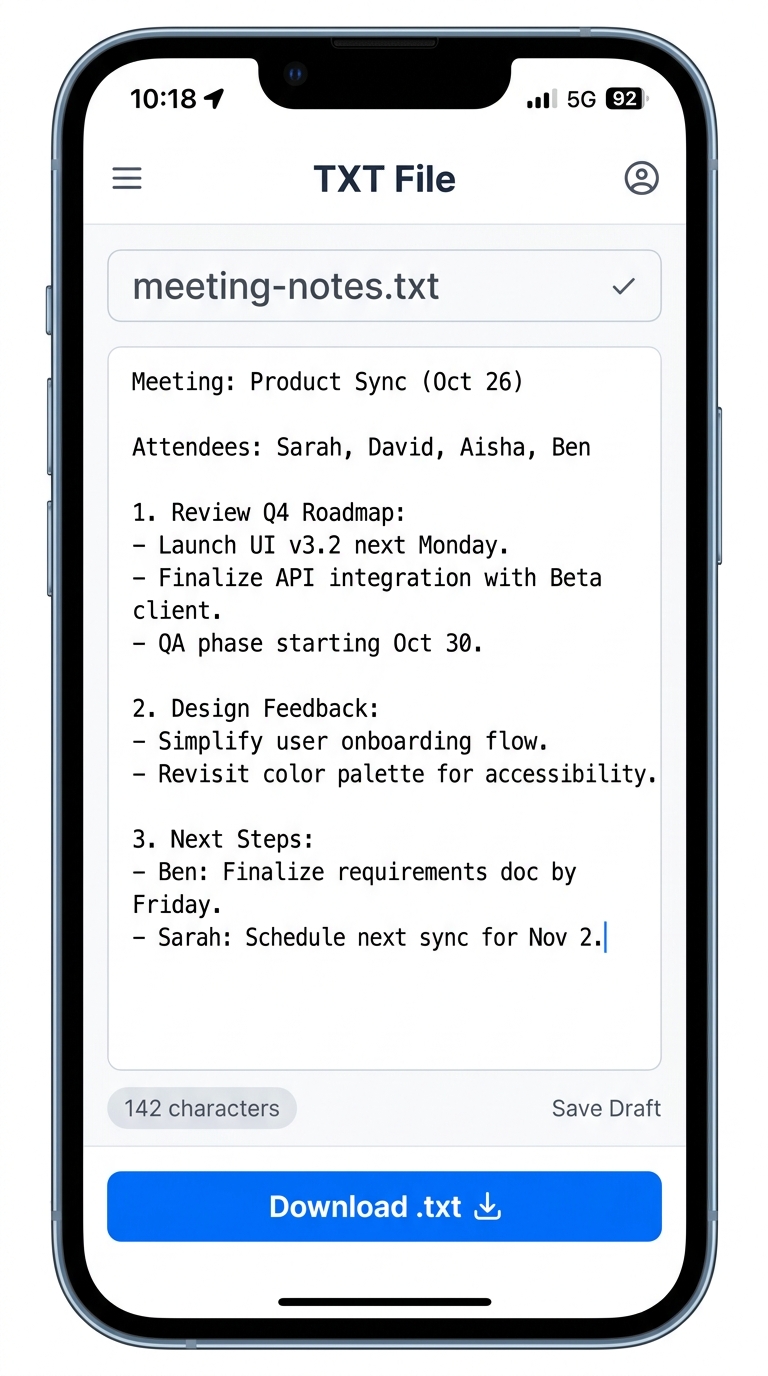
Create Real .txt Files Directly on Your Phone
iOS and Android have no built-in “New Text Document” option, and note apps save in proprietary formats. TXT File gives mobile users a 1-tap plain text generator in Safari and Chrome with zero app downloads.
Load txtfile.site in any mobile browser. Runs entirely offline with zero battery drain.
Type your title. Spaces convert to safe hyphens automatically, appending .txt cleanly.
Tap “Download .txt” to instantly save your file to the iOS Files app or Android Downloads folder.
Why People Use TXT File Instead of Opening Notepad
⚡ No app switching
You’re already in the browser. Opening a desktop editor, saving to a folder, and finding it again takes longer than doing it here.
🍎 It fixes the Mac gap
macOS has no right-click “New Text Document” the way Windows does, and TextEdit defaults to rich text format. This tool gives Mac users a one-click plain text file with no format wrangling.
📱 It works on phones
iOS and Android have no straightforward way to produce a real .txt file. Here you type, tap download, and it lands in your Files app.
🔒 Nothing is uploaded
Most online tools send your content to a server to process it. This one doesn’t — there’s no endpoint to send it to. Your notes, credentials, drafts, and snippets stay on your machine.
⚙️ It handles the edge cases
Encoding and line endings are the two things that quietly break text files. Most competing tools ignore both.
What People Create Here
Capture thoughts or drafts quickly without opening a bulky word processor.
.env samples, JSON blobs, SQL queries, shell commands, and docker envs.
Lightweight tabular or delimited records that any script or tool can parse.
The plain text configuration files that every search engine and website needs.
Simple project documentation and software notes that render cleanly anywhere.
Packing lists, inventories, tasks, and to-do checklists without sync overhead.
Paste from Word or a webpage to strip hidden styling before reusing text elsewhere.
Your Text Stays on Your Device
Frequently Asked Questions
Where does my downloaded file go?
How do I open a .txt file?
Can I create a TXT file on my phone?
Why do my special characters show as question marks or boxes?
My line breaks disappeared when I opened the file. Why?
What’s the difference between UTF-8 and UTF-8 with BOM?
Is there a size limit?
Can I edit a text file I already have?
Do I need an account?
Does it work offline?
Is it really free?
What’s the difference between .txt and .doc?
Make Your First File
Nothing to install, nothing to sign up for. Type your text and download it.
Open the Editor